
Share & earn · 11 STEPS

Earn and claim your project bonus

Your private green checklist helps you promote your project and keep its page useful. It is separate from products offered to supporters. Completing a valid paid step earns 300 sats; the total is capped at 2,100 sats per project.

Reviewed 10 November 2026 · English guide
WATCH THE WALKTHROUGH

Grow your project and claim rewards

1 min 35 sec · English on-screen guide & music

Actual desktop footage with English on-screen guidance and instrumental lounge music. No voice-over. Mila and SatsGarden are fictitious. Payments and social-post verification shown in the walkthrough are simulated. Pause to follow along; tutorial invoices cannot be paid.

Read the video transcript and chapters
  1. 0:03 Your private project checklist

    Only the project owner sees this reward panel.

  2. 0:08 A clear path to progress

    Earn 300 sats per reward step, up to 2,100 sats per project.

  3. 0:13 Help when you need it

    Info icons explain what counts and how each step is checked.

  4. 0:17 Share on X or Nostr

    Choose a network, review your message and post it yourself.

  5. 0:23 Keep your supporters in the loop

    Open the update editor straight from your checklist.

  6. 0:26 Publish a project update

    A useful progress update earns your first 300 sats.

  7. 0:34 Progress is tracked automatically

    Your earned amount updates as valid steps are completed.

  8. 0:38 Make your next steps clear

    A roadmap or two FAQ answers completes this choice group.

  9. 0:41 Add a roadmap step

    Choose an honest, practical next step.

  10. 0:43 Show what comes next

    Save the next step and earn another 300 sats.

  11. 0:48 Support another maker

    Explore projects from the site or from your checklist.

  12. 0:51 Find a project you want to follow

    Your own projects and team projects do not count.

  13. 0:54 Follow another maker’s project

    Your follow is counted automatically. No proof to paste.

  14. 0:59 Come back and keep building

    Claims open after seven public days and three different sign-in days.

  15. 1:04 One week later

    Demo timeline · seven public days and three sign-in days completed.

  16. 1:08 Your initial conditions are complete

    Seven public days and three different sign-in days unlock your first claim.

  17. 1:11 Claim your earned sats together

    Confirm with your password. The payout goes to your recorded wallet.

  18. 1:16 Your payout is confirmed

    The checklist records which rewards have already been paid.

  19. 1:21 Another verified step. Another 300 sats.

    Public posts are checked automatically after you share.

  20. 1:26 No second seven-day wait

    Once the initial conditions are met, claim newly earned sats immediately.

Download MP4 · English captions

Before you start

  • Sign in as the original owner and open your published project. Visitors and team members cannot open your private checklist.

  • A claim needs a funded reward reservation and the original validated receiving wallet. Existing active projects never need to pay a second publication contribution.

  • Seven uninterrupted public days and activity on three different sign-in days are the initial claim conditions.

Follow along with Mila & SatsGarden, our fictional example account and project. Screens show example data.

Open your private checklist

Find Your project bonus below the funding panel and choose Open your checklist. Click an item to open the matching action; info icons explain the rules. The donut measures completed requirements, including the activity gates. Sats earned, requested and paid are separate money states.
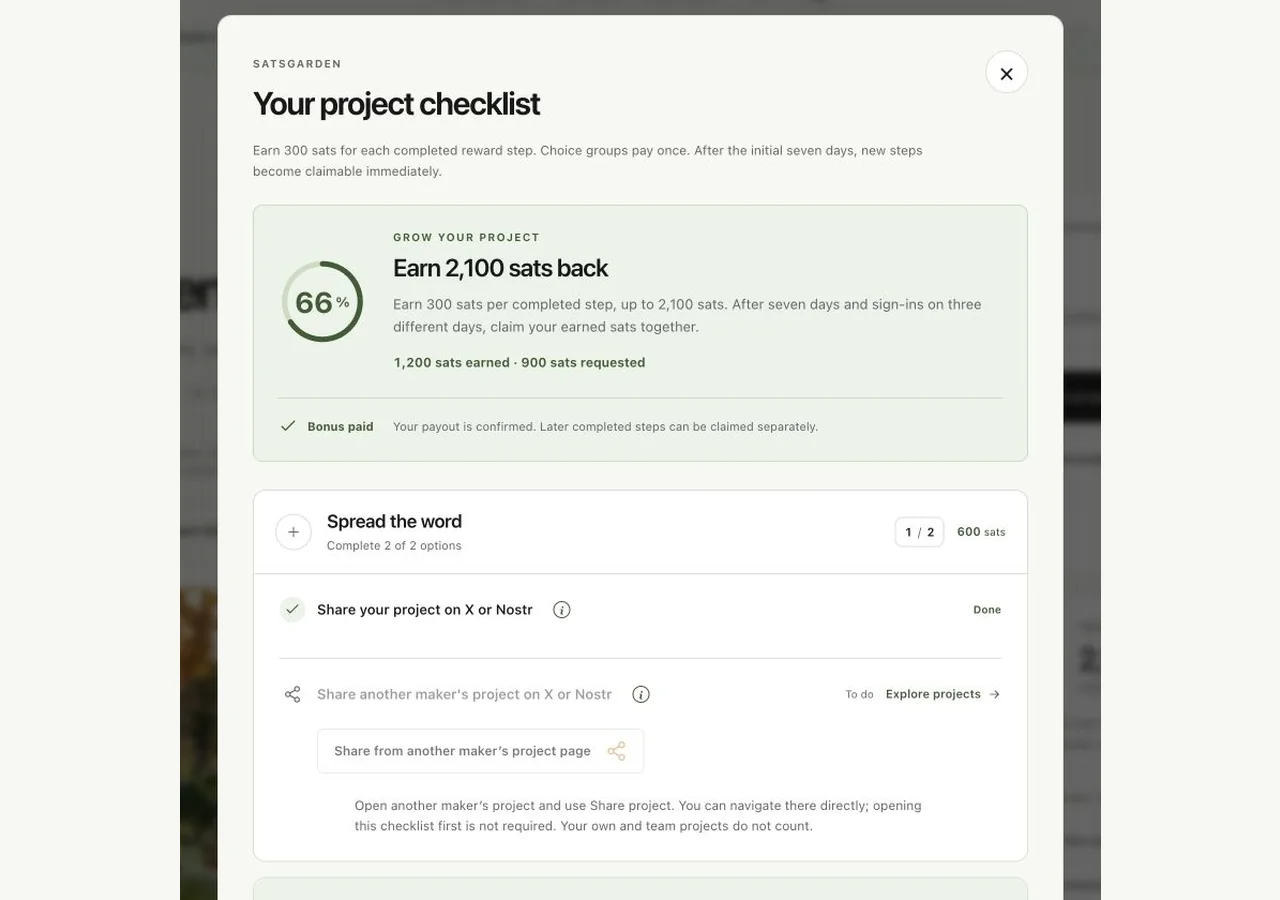
Enlarge screenshot: The owner-only modal shows requirement progress separately from earned and requested sats.
The owner-only modal shows requirement progress separately from earned and requested sats. Tap to enlarge.

Share your own project and another maker’s

Each of these two separate sharing goals earns 300 sats once. Choose X or Nostr for each goal. Use Share project, keep reward attribution enabled and publish the prepared personal link yourself. Opening the composer does not complete a goal. Automatic checks must confirm the public post. Your own and team projects cannot count as another maker’s.

Follow other makers’ projects

Use Follow project on other published project pages. The target equals the number of active published projects you own: four active projects means following at least four different eligible external projects. Your own projects and projects you are a team member of do not count. Repeatedly following the same project does not increase the count.

Publish a useful project update

Click Publish a project update to open the update editor. Publish actual progress; sending email is optional. Existing published updates on this same project count, including genuine history from before the bonus module. Drafts, future scheduled updates and updates on another project do not count.

Add a roadmap step or two FAQ answers

Complete one of these options: a saved roadmap step, or two complete FAQ questions and answers. They share one 300-sat reward. Doing both improves the page but does not pay this choice group twice.

Show your project with images or a video

Complete one option: at least two distinct gallery images beyond the cover, or a supported project video. This choice group pays 300 sats once. The cover by itself does not fulfil the two-gallery-image option.

Fund another maker or receive one funding

Either make a confirmed eligible donation to another maker’s project or receive one confirmed contribution from another eligible account. Your own and team projects/payments do not count. Unpaid invoices and anonymous payments that cannot be attributed do not complete the step. The normal minimum donation applies.

Complete the initial week and three sign-in days

The timer follows the project’s publication date, not its payment date or the day this module appeared. Keep the project continuously published for seven full days. Leaving published status before the week is complete restarts that unfinished timer on republishing; an achieved week stays complete. Your first authenticated day starts at 1/3. Return while signed in on two more calendar days, using Europe/Amsterdam time. You do not need to sign out; repeated visits on the same day do not add days.
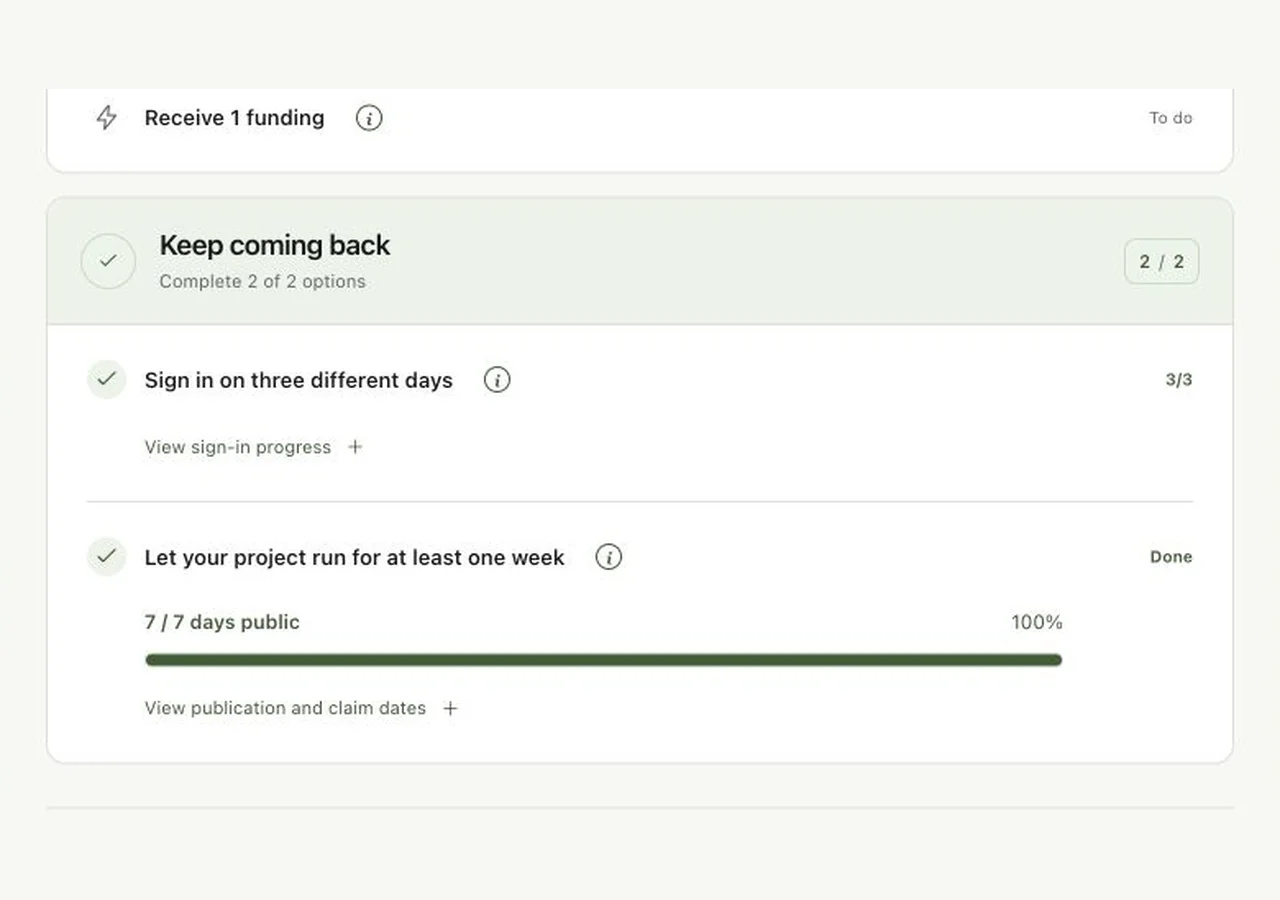
Enlarge screenshot: The public-week progress bar and three separate sign-in days are initial claim conditions, not extra paid reward steps.
The public-week progress bar and three separate sign-in days are initial claim conditions, not extra paid reward steps. Tap to enlarge.

Claim the available amount together

After the initial conditions are complete, choose Claim … sats for your available earned amount. Confirm your current password and the requested authenticator/recovery check if two-factor authentication is enabled. The payout remains bound to the original owner and recorded receiving wallet; this dialog cannot redirect it. Each paid step is claimable once.
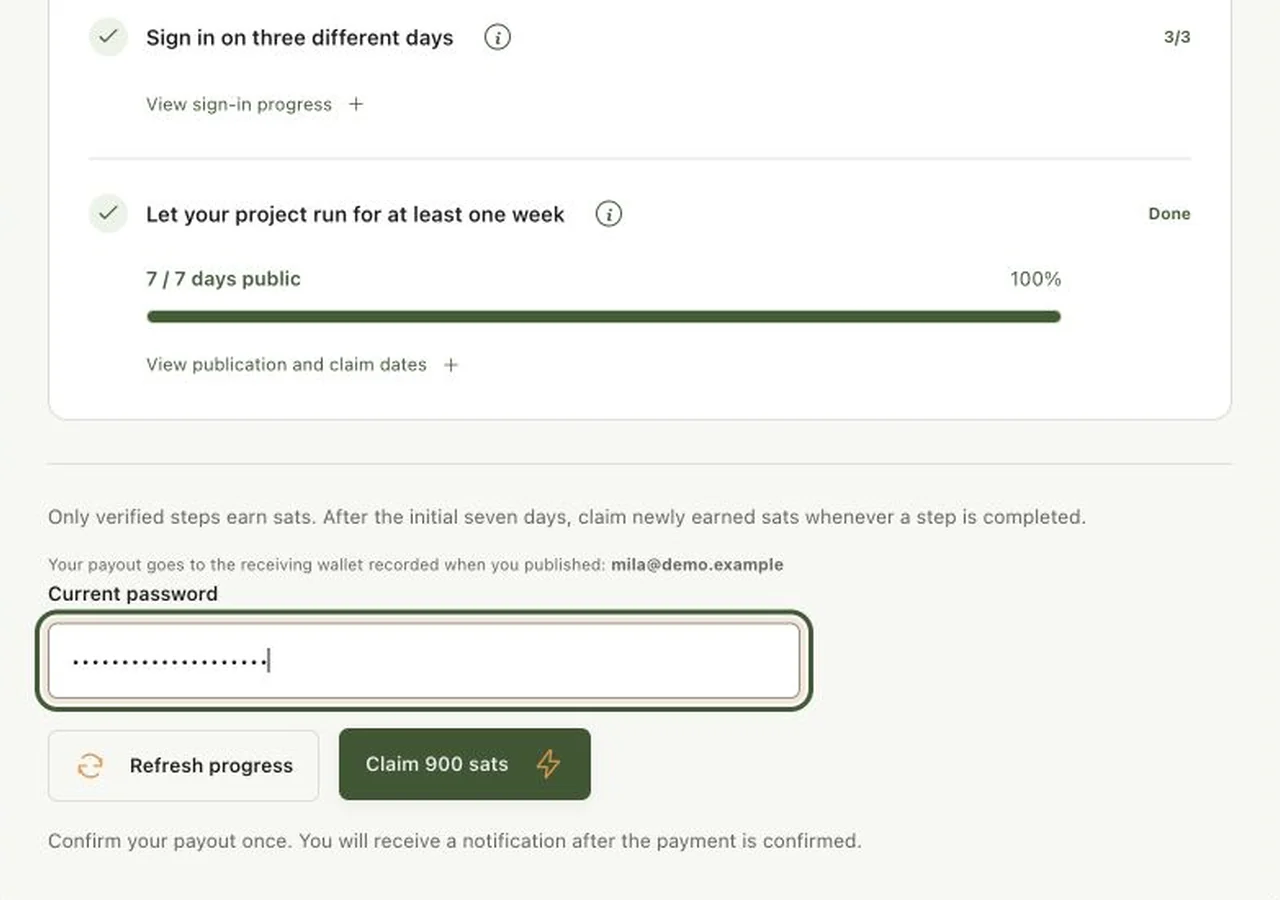
Enlarge screenshot: The claim action confirms the recorded destination and requires fresh account authentication.
The claim action confirms the recorded destination and requires fresh account authentication. Tap to enlarge.

Wait for payout confirmation

A queued or requested claim is not yet a confirmed payment. The system processes it and sends a notice after confirmation. Keep the existing request if it is still processing; do not create repeated requests or pay another publication contribution. A temporarily unavailable provider or insufficient funded reserve can hold a claim.

Claim later steps without another week

After the first seven-day and three-day conditions have been met, newly completed valid steps become claimable immediately. Previously requested steps remain reserved and cannot be claimed twice. Optional reminders are combined into at most one weekly digest per owner; switch Weekly project bonus reminder off in Email preferences if you prefer.

You’re all set when…

  • You understand which seven steps pay and which conditions unlock claims.

  • You can distinguish checklist progress, earned sats, requested sats and confirmed payout.

Your next step.

Browse the FAQ

These settings only affect optional visit measurement. Signing in, supporting projects and payment confirmations keep working.

Deleting cookies, switching browsers or using another device starts a new browser identity. Unique browser counts are estimates, not a count of individual people. You can change this choice here at any time.

Privacy details
Share on X

Choose how to share. Nothing is posted automatically.

Start typing to explore the network.